
AIReel : AI Video Generator
FunCreate LimitedArt & Design
4.3820.00 Reviews
- Version
- 3.4.3
- Installs
- 5.00M
- Age Rating
- Teen
Screenshots
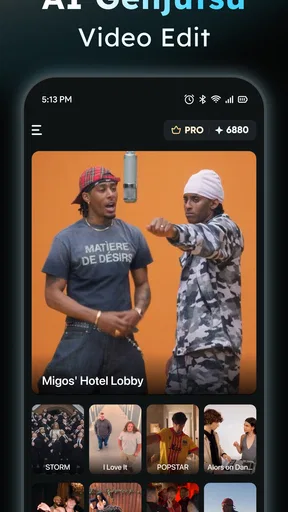
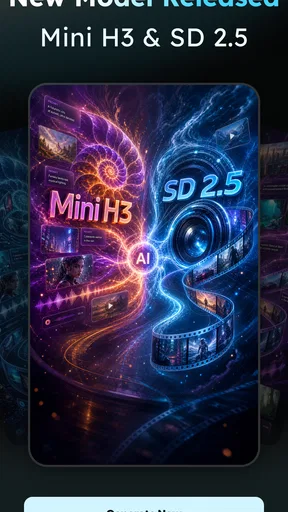
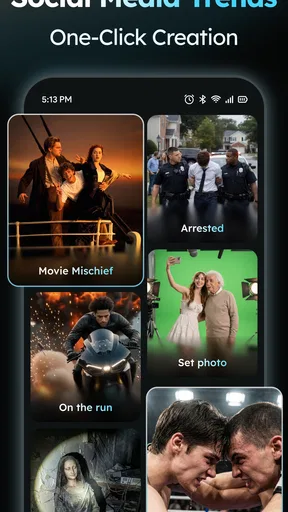
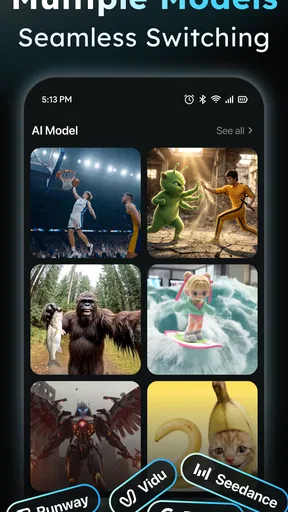

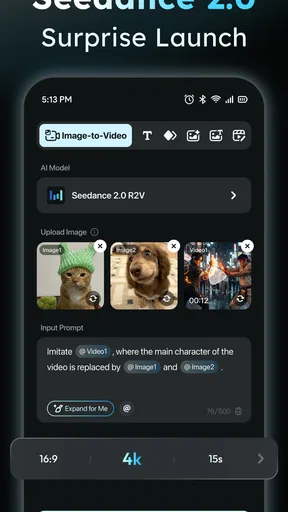
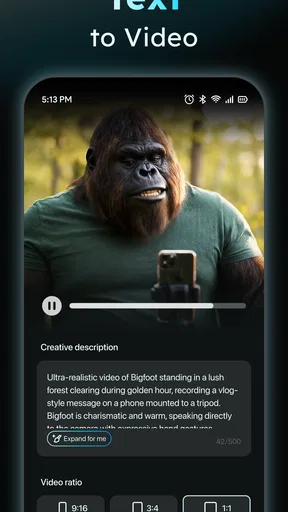
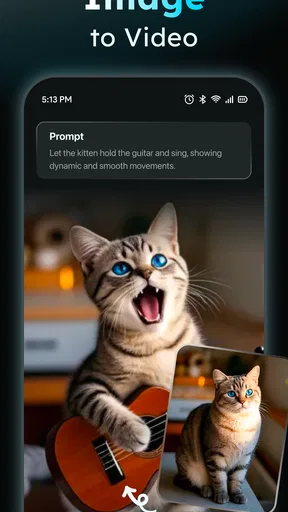
Our Review of AIReel : AI Video Generator
 Analysis by Appyee
When I want to turn an idea or a few images into something more shareable, I’m interested in tools that lower the effort without making every result look the same. AIReel: AI Video Generator is an art and design app from FunCreate Limited that puts AI-assisted video creation on a phone. Its focus makes it appealing for quick creative experiments, though I’d treat it as a shortcut for getting started rather than a replacement for careful editing.
What to expect from the pace
The app is free to install, and its video-generation focus suggests a straightforward path from a visual idea toward a finished clip. I wouldn’t plan around a guaranteed turnaround time: generation and rendering can depend on the task and the phone, so it’s sensible to leave room for a wait when a video is needed by a deadline. For a casual post, that trade-off may be fine; for a time-sensitive client deliverable, I’d keep a conventional editing option available.
AIReel has a 4.5 average from around 14,000 ratings, and it has passed one million installs. Those figures suggest that plenty of people are trying it, but they don’t tell me whether a particular prompt or image will produce the result I have in mind. I’d judge it by a small test project before relying on it for a larger batch of content.
Where a creative session gets demanding
Image-to-video work is especially useful when I have a strong still image but no footage to cut together. A local shop could use it to give a product photo more movement for a social post, while a hobby creator might test several visual directions before choosing one to develop. Text-led ideas serve a different purpose: they let me explore a mood or concept before I have the images ready. In either case, a clear, specific starting point is more practical than expecting the app to rescue a vague idea.
One useful habit is to separate experiments from final work. I’d try a short, focused prompt or a single image first, check whether the motion and composition suit the intended platform, and only then invest time in refining the concept. This reduces wasted effort if the result misses the mark. It also makes it easier to compare outputs fairly, because changing several parts of an idea at once leaves me guessing which change helped.
Reliability and room for judgement
AI-generated video can be uneven by nature: a result may look appealing at a glance but still handle a face, product detail, or text in a way I wouldn’t want to publish. I’d inspect the whole clip before sharing rather than judging it by its opening moment. If accuracy matters, such as showing a product feature clearly, a straightforward edit built from real footage is usually the safer choice.
AIReel is listed as Teen, so it is not positioned as an app for young children. It is free to try, with optional in-app purchases ranging from $6.99 to $109.99 per item. I’d explore the free experience before paying, then decide whether a particular paid option solves a recurring need rather than buying in the hope that every generated result will improve.
Phone limits and practical choices
The app’s minimum operating-system requirement is version 7.0, and the current version is 2.6.2. A compatible system is only one part of the experience, though: generating and previewing video can be more demanding than browsing or editing a still image. If a session feels sluggish, I’d close other heavy apps, make sure there is room to save the result, and try a smaller test before committing to a longer creative session.
Compared with a conventional mobile video editor, AIReel is best approached as a way to create or explore material, not as the place to make every precise cut. A standard editor gives more direct control over timing and shot order; a design app may be better for a polished static graphic. I’d choose AIReel when the starting point is an image or a text idea and motion is the goal, then move to another tool if fine control matters more than speed.
Let's dive into the world of AIReel: AI Video Generator, an app that promises to transform your video creation experience into something effortless and fun. Whether you're an aspiring content creator or just someone who loves to share moments creatively, this app might just become your new best friend.
Getting Started with AIReel
First things first, downloading and installing AIReel is a breeze. Just hit your app store, and you’re good to go. Once you open the app, you’re greeted with a sleek, intuitive interface that feels inviting rather than overwhelming. It's like the app knows you’re here to make magic happen without any fuss.
Exploring the Features
Now, let’s get to the juicy part—the features. AIReel offers a plethora of tools that are not only useful but genuinely exciting to explore. The app uses AI to assist in video editing, making it accessible even if you’re a total newbie. You can start by selecting from a variety of templates, which is perfect for those days when creativity is running low.
One of the standout features is the auto-editing tool. Imagine this: you upload your raw footage, and the app suggests edits, transitions, and even music that fits the vibe of your video. It’s like having a little director inside your phone, guiding you to make the best possible content.
The AI Magic
The AI in AIReel isn’t just a gimmick; it’s the real deal. It analyzes your video’s content, understands themes, and even suggests enhancements. The AI-driven color correction is particularly impressive. It takes your video from dull to dazzling with just a tap. And let’s not forget the AI voiceover feature, which can narrate your videos in various tones and accents. It’s like having a diverse cast of narrators at your fingertips.
User Experience
Using the app feels like a journey rather than a chore. The learning curve is minimal, and the app doesn’t bombard you with ads every two seconds—which is a relief. Navigating through the app is smooth, and I rarely encountered any bugs or crashes. Everything just works, which is something I can’t say for many apps out there.
Moreover, the editing process is swift and efficient. You’re not waiting forever for your video to render, which is a huge plus if you’re on-the-go. The app also allows for easy sharing across social media platforms, ensuring your creations reach your audience in no time.
Potential Improvements
While AIReel is pretty fantastic, there’s always room for improvement. I noticed that while the AI suggestions are generally spot-on, they can sometimes be a bit repetitive. A little more variety in the suggestions would be a welcome addition. Additionally, while the app is mostly free, some advanced features do require in-app purchases, so be prepared for that if you’re looking to unlock its full potential.
Final Thoughts
In the end, AIReel: AI Video Generator is a delightful tool for anyone looking to spice up their video content with minimal effort. It's perfect for social media enthusiasts, vloggers, or anyone who loves capturing life's moments in a creative way. The AI-driven features make it stand out from the crowd, and it’s an app I find myself reaching for time and again.
If you’re ready to elevate your video editing game, give AIReel a try. It’s user-friendly, packed with features, and a lot of fun to use. So, go ahead, download it, and let your creativity run wild!
A low-pressure way to test an idea
A practical everyday use is making a simple visual for a weekend event or a small business update. I might start with one clear image, decide what the clip should communicate, and use the generated motion as a draft rather than assuming it is ready to post. If the image contains a logo, a label, or small product details, I’d check those carefully: movement can draw attention to visual quirks that are easy to miss in a still.
For social content, I’d also think about the destination before creating. A clip meant for a quick story has different needs from one intended to explain a service or preserve a family moment. Keeping the message to one idea makes the result easier to assess. If I want to communicate several points, I’d create separate pieces or use a regular editor to control their order instead of asking one generated scene to do too much.
Making the result more useful
A non-obvious trade-off with AI video is that a more elaborate prompt is not automatically a better one. I’d describe the subject, the kind of movement I want, and the mood, while avoiding a pile of competing directions. Then I’d change one element at a time if the first result is off. This makes experimentation easier to learn from and helps keep a promising visual concept from becoming cluttered.
I’d also preserve the original image or text idea separately. That way, if the generated motion distorts an important element, I can try a different approach without losing the source material. For a polished post, a useful workflow is to generate the visual, review it at full attention, and then use a traditional editor for any finishing decisions that require exact timing or placement. AI can help create a starting point, but it does not remove the need for an editorial check.
Who will enjoy it—and who may not
I’d recommend trying AIReel if you regularly make casual social content, enjoy testing visual styles, or have images that could use a more lively presentation. It may also suit beginners who find a blank editing timeline intimidating and would rather begin with an idea than assemble every element manually. The appeal is less about replacing creative judgement and more about making the first draft feel within reach.
I’d skip it as my main tool if I needed precise control over every frame, dependable representation of a product, or a repeatable workflow for professional delivery. In those cases, a conventional editor with direct timeline controls is a better fit. Someone who mainly needs posters, thumbnails, or other still designs may get more value from a dedicated graphics app. The right choice depends on whether the task is to invent motion or to control it closely.
Getting comfortable before relying on it
New users may wonder whether they need editing experience. I don’t think they need to be video specialists to explore an AI-led workflow, but a little patience helps: compare the output with the original idea and decide what actually needs improving. The app’s Teen content rating is another useful consideration for families choosing creative software; I’d still use ordinary judgement about what a young person creates and shares.
Another reasonable question is whether it makes sense to spend money immediately. I’d begin with the free app and see whether its approach fits the kind of projects I make. Optional purchases can range from $6.99 to $109.99 per item, so I’d check the particular option and its value to my own use before committing. A paid choice is easiest to justify when it addresses a repeated limitation, not when I’m simply hoping it will make every idea work.
Performance verdict
For me, AIReel’s strongest case is quick creative exploration on a phone: it gives image- and text-based ideas a route into video without requiring me to begin with a complicated edit. I’d keep expectations measured, inspect outputs before sharing, and use a more controlled tool when detail or consistency matters. FunCreate Limited has built an approachable option for experimentation, and its 2.6.2 version is available for devices running Android 7.0 or later.
Overall, I’d treat it as a useful creative companion rather than an all-purpose production suite. Its 4.5 average and more than one million installs make it a familiar choice for many users, while the real test is whether its results suit your own projects. If you like exploring visual ideas and can accept some trial and error, it is worth trying; if you need exact, predictable edits, a traditional editor is likely the more comfortable choice.
Privacy and Permissions
See what permissions an app requests and how it handles your data.
- Phone
- read phone status and identity
- Photos/Media/Files
- read the contents of your USB storage, modify or delete the contents of your USB storage
- Storage
- read the contents of your USB storage, modify or delete the contents of your USB storage
- Camera
- take pictures and videos
- Wi-Fi connection information
- view Wi-Fi connections
- Device ID & call information
- read phone status and identity
- Other
- view network connections, full network access, control vibration, prevent device from sleeping, Google Play license check, read Google service configuration
Verdict
Strengths of AIReel : AI Video Generator
- Easy-to-use interface for quick video creation.
- Offers a variety of templates for diverse needs.
- High-quality video output suitable for all platforms.
- Fast processing time, even for longer videos.
- Regular updates with new features and templates.
Limitations of AIReel : AI Video Generator
- Limited customization for advanced users.
- Requires internet connection for most features.
- Some templates locked behind a paywall.
- Occasional glitches with video rendering.
- In-app ads can be intrusive at times.
Similar Picks in This Category
View All
Canva: AI Photo & Video Editor
Canva4.8

PENUP – Drawing-sharing SNS
Samsung Electronics Co., Ltd.4.5

Crafto
Kutumb App4.6

Sketchbook
Sketchbook4.1

ibis Paint X
ibis inc.4.5

Adobe Express: AI Photo, Video
Adobe4.6
Frequently Asked Questions
What is AIReel: AI Video Generator?
AIReel: AI Video Generator is an innovative app that allows users to create professional-quality videos using artificial intelligence technology. It offers a range of templates, effects, and editing tools, making video production accessible and straightforward for both beginners and experienced editors.
Is AIReel user-friendly for beginners?
Yes, AIReel is designed with a user-friendly interface that simplifies the video creation process. With intuitive drag-and-drop features and guided tutorials, beginners can easily navigate the app and create engaging videos without any prior editing experience.
What features does AIReel offer?
AIReel provides a variety of features including customizable templates, AI-driven effects, voiceover capabilities, and music integration. Users can also leverage advanced editing tools to fine-tune their videos, ensuring a polished final product that meets their specific needs.
Is AIReel available on both Android and iOS?
Yes, AIReel is available for download on both Android and iOS platforms. Users can find the app on the Google Play Store for Android devices and the Apple App Store for iOS devices, making it accessible to a wide range of users.
Are there any subscription fees for using AIReel?
AIReel offers a free version with basic features, but to access premium tools and functionalities, users may need to subscribe to a paid plan. The subscription fees vary based on the plan chosen, providing flexibility for different user needs and budgets.
